Take the Guesswork Out of Budgeting
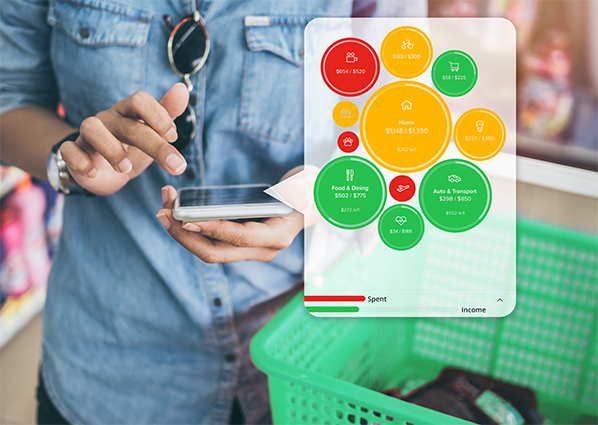 Managing your money doesn’t have to be complicated. With MX, our money management tool built into mobile and online banking, you get a clear, visual breakdown of where your money is going—no extra apps required. Whether you want to let MX auto-create budgets for you or customize them yourself, it’s built to make budgeting effortless.
In this guide, we’ll walk you through how to set up, adjust, and track your budgets so you can stay on top of your spending with ease.
Not enrolled in online or mobile banking yet? Register in minutes.
How To Use the Budgets Tool
When you open the budgets tool for the first time, you'll want to create a budget.
You can select Auto-Create Budgets to do this automatically.
A screen will appear with green, yellow, and red bubbles. These are your budgets.
- Bigger bubbles mean bigger budgets.
- A green bubble means you still have money to spend in that category.
- A yellow bubble means you’ve spent over 80 percent of that budget.
- A red bubble means you’ve gone over that budget.
If you can’t see all of the bubbles, tap and drag on the bubbles until you find the one you're looking for. The rest will move out of the way automatically.'
Watch the video below to learn how to create budgets in MX:
Learn more about MX and how to get started.
Spend vs. Income
A red bar and a green bar show the amount you have left to spend and how much of your projected income you have earned.
Tap the small arrow to see details and how much money you have left unbudgeted. This number automatically adjusts as you adjust your budgets. You can adjust the projected income if the app’s automatic calculation seems incorrect by tapping the green number and entering a new one.
Budget Months
Near the top of the screen, you’ll see a month. The Budgets panel will display the current month when you first open it.
To view how you did on past budgets, hit the back button until you find the month you’re looking for.
How To View a Budget Category
- Open the menu, then select Budgets.
- Select any budget bubble to display more details. The category bubble will show details about that budget category. There's also a bar graph with your monthly spending in that category over the last year, along with a dotted line indicating how much you budgeted.
- Select any bar to bring up the budget details for that month.
How To Edit a Budget
- Open the menu, then select Budgets.
- Select a category bubble.
- Select the edit icon attached to the category bubble.
- Drag around the outside of the bubble to increase or decrease the budget. Alternatively, you can select Budgeted Amount to enter a specific number.
The 3 Month Average of your spending in each category, listed above the budget bubble, can guide you when choosing an appropriate budget.
How To Delete a Budget
- Open the menu, then select Budgets.
- Select a category bubble.
- Select the edit icon attached to the category bubble.
- Select Delete [Category] Budget.
- Select Delete.
How To Create a Sub-budget
- Open the menu, then select Budgets.
- Select a category bubble.
- Select the add icon attached to the category bubble.
- Select the subcategory you’d like to add a budget for.
- If the subcategory doesn’t exist, create one by selecting Add New Subcategory and typing a name. After you’ve created a sub-budget, it will appear connected to its main budget.
- Select a sub-budget to bring up more details, make edits, view transactions over the past year, or delete it.
Start Budgeting Smarter Today
Budgeting doesn’t have to be a chore. With MX, you’ll always know where your money is going and how to stay on track—without the hassle of manual tracking or extra apps. Whether you’re just getting started or fine-tuning your spending habits, MX makes it easy to take control of your finances.
Log into your online or mobile banking account today and start using the Budgets tool to make your money work for you.



 Sign In
